.png?width=1295&height=377&name=Copy%20of%20Pathfinder%20Specialists%20Logo%20-%20Dark%20(2).png)

IT Service Management (ITSM)
Ivanti Neurons
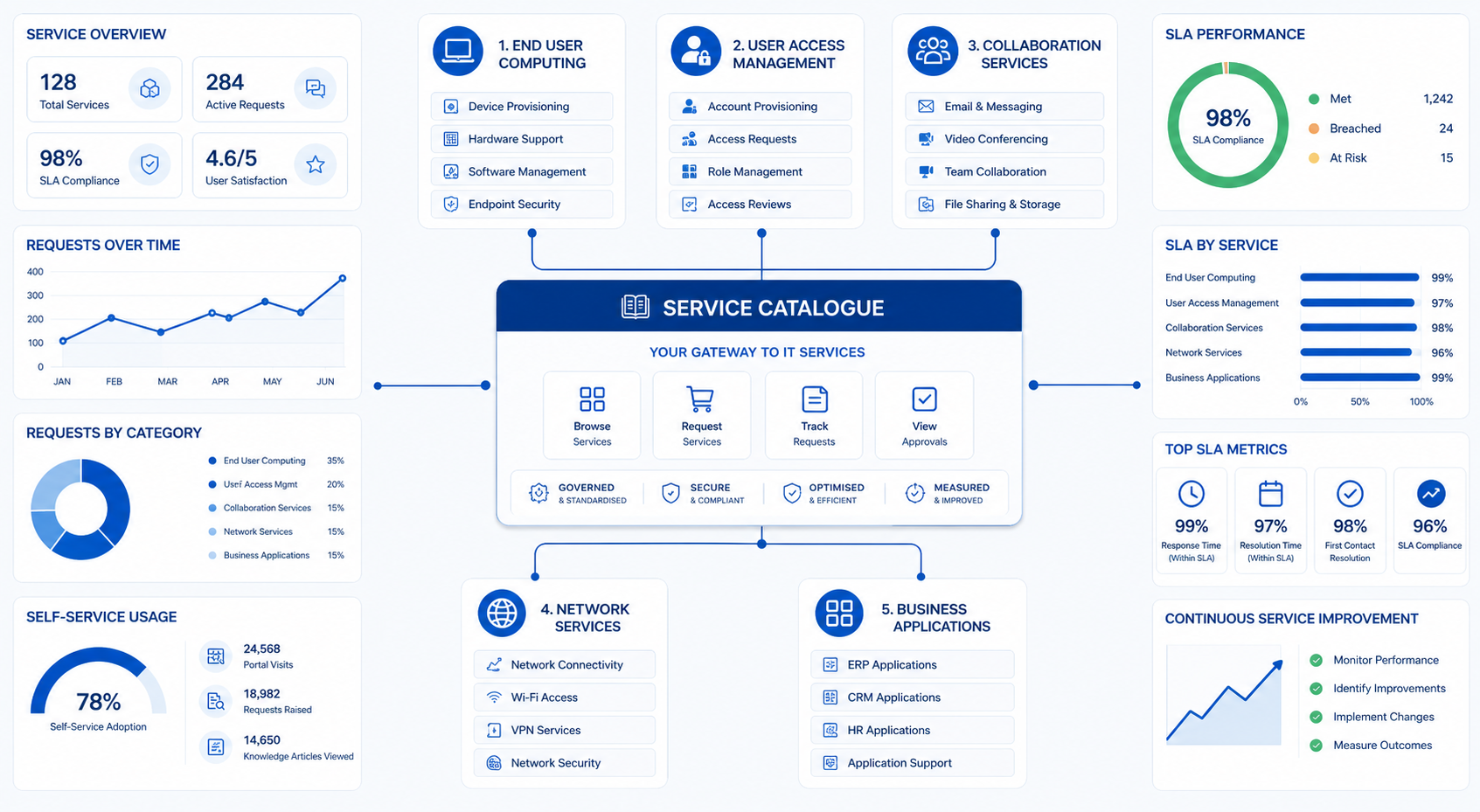

Many organisations invest significant time and money in their ITSM platform, yet one of the most important foundations is often overlooked:
Services and categories.
When services and categories are poorly designed, users struggle to find what they need, support teams receive inaccurately logged tickets and reporting becomes unreliable.
On the other hand, a well-structured service catalogue makes it easier for users to request support, enables automation, improves reporting and provides greater visibility into service performance.
The service catalogue should act as the single source of truth for the services available to the business, helping users understand what IT provides and how those services can be accessed.
In this article, we'll explore how to structure services and categories effectively, optimise an existing service catalogue and use reporting to drive continual improvement.
Services and categories are more than simply dropdown fields on a ticket form.
They form the foundation of many critical ITSM processes, including:
A well-structured catalogue helps users quickly identify the service they need and allows support teams to accurately route, prioritise and resolve requests.
Without a clear structure, organisations often experience:
One of the most common mistakes organisations make is structuring services around internal IT teams rather than the services that users actually consume.
For example:
❌ Infrastructure Team
❌ Desktop Team
❌ Messaging Team
❌ Network Team
Whilst these structures may make sense internally, they often create confusion for users and make reporting less meaningful.
Instead, services should reflect business-facing capabilities such as:
✅ Collaboration Services
✅ End User Computing
✅ User Access Management
✅ Network Services
✅ Business Applications
✅ Security Services
This approach makes it easier for users to find the right service whilst providing more meaningful reporting and clearer service ownership.
One of the most common mistakes organisations make is confusing services with categories.
A service represents something the organisation delivers to its users.
Examples include:
Services should be business-focused and easily understood by users.
Categories provide additional classification within a service.
For example:
Service: User Access Management
Categories:
Another example:
Service: End User Computing
Categories:
Categories help refine requests and improve routing, reporting and trend analysis.
Many organisations operate with service catalogues that have evolved over several years without proper governance.
Warning signs include:
It is not uncommon to find hundreds of categories accumulated over time.
Users become overwhelmed by options and often choose the wrong one.
Examples:
Multiple variations create inconsistent reporting.
Retired applications or systems remain available for selection long after they have been decommissioned.
Users should not need detailed technical knowledge to raise a ticket.
For example:
❌ Exchange Online Mailflow Issue
✅ Email Problem
If "Other" is one of your most used categories, your service catalogue probably needs refinement.
Even with good intentions, many organisations create unnecessary complexity within their service catalogue.
Common mistakes include:
The goal should be simplicity, consistency and usability.
If users cannot easily find the right service, they will take shortcuts, and reporting quality will quickly suffer.
One of the biggest mistakes IT teams make is designing the catalogue around internal support structures rather than user needs.
Users care about:
They do not care which support team owns it.
A good test is to ask:
Would a non-technical employee understand this service name?
If the answer is no, reconsider the naming convention.
Consistency improves:
For example:
| Poor Naming | Better Naming |
|---|---|
| AD Account | User Access |
| O365 | Microsoft 365 |
| VPN Connection Issues | VPN |
| Email System | Email Services |
Establishing clear standards helps prevent duplication and confusion.
More categories do not necessarily mean better reporting.
Instead of creating multiple categories for every possible issue, focus on meaningful classification that supports reporting and operational decision-making.
Keep the structure simple and intuitive.
Every service should have a clearly identified owner responsible for:
Without ownership, service catalogues quickly become outdated.
Services evolve constantly.
Applications are introduced, upgraded and retired.
Review your catalogue regularly to:
Treat the service catalogue as a living asset, not a one-time project.
Many organisations already have a service catalogue, but it may no longer accurately reflect how services are delivered.
Review:
This provides a clear picture of where improvements are needed.
Look for:
Consolidate where possible.
Ask:
A service catalogue should clearly explain:
Clear descriptions improve self-service adoption and reduce confusion.
Avoid creating categories simply because they exist in the tool.
Categories should support meaningful reporting and operational decision-making.
Self-service remains one of the most effective ways of supporting a shift-left strategy.
However, users cannot successfully self-serve if they cannot find what they need.
An effective service catalogue should help users:
When supported by strong knowledge management practices, a well-structured service catalogue can significantly reduce ticket volumes and improve employee experience.
One of the biggest benefits of a well-designed service structure is improved reporting.
If services and categories are accurate, reporting becomes significantly more valuable.
Track:
Questions you can answer:
Measure:
This helps identify services causing operational challenges.
Review:
This enables service owners to focus improvement efforts where they will have the greatest impact.
Whilst operational teams often focus on ticket volumes and SLA performance, senior stakeholders are typically more interested in service outcomes.
Consider reporting on:
This helps demonstrate the value that service management delivers to the wider organisation.
Track:
High-performing services often have strong knowledge management and self-service capabilities.
Collecting data is only part of the journey.
The real value comes from using reporting to drive decisions.
For example:
A service generating large numbers of tickets may require:
This may indicate:
This often suggests:
Reporting should drive conversations around service improvement rather than simply measuring performance.
A service catalogue should never become a "set and forget" exercise.
Create a regular governance process to review:
Many organisations review their catalogue only when problems arise. Regular governance helps prevent catalogue sprawl and keeps services aligned with business needs.
Ask yourself:
✅ Are all services still active?
✅ Does every service have a clearly assigned owner?
✅ Can non-technical users easily understand service names?
✅ Are categories helping improve reporting?
✅ Are users successfully using self-service?
✅ Are retired services removed promptly?
✅ Is the catalogue reviewed regularly?
✅ Can leadership clearly report on service performance?
If you answered "No" to several of these questions, it may be time to review and optimise your service catalogue.
The most effective service catalogues are not necessarily the largest or most detailed. They are the ones that make it easy for users to find what they need, provide meaningful reporting and support continual service improvement.
If your organisation has not reviewed its services and categories in several years, there is a good chance your catalogue has become more complex than it needs to be.
By simplifying service structures, assigning ownership, improving governance and focusing on reporting that drives decision-making, organisations can create a service catalogue that delivers real business value.
A well-optimised service catalogue improves user experience, strengthens self-service adoption, supports automation and provides the visibility needed to make better service management decisions.
Whether you're reviewing your service portfolio, improving reporting, increasing self-service adoption or preparing for AI-driven service management, strong service and category design is essential.
Taking the time to refine your catalogue today can help create better user experiences, improve operational efficiency and provide the insights needed to drive continual service improvement in the future.